Use Teams to record a video lecture

An important note: The steps below work in the Teams App on my machine running in Windows 10. We’ve come to realize that different operating systems have different features and behavior. If you have a Mac, Chromebook, or use the browser-based Teams site, please let everyone know how/if this works for you in the comments below. Thanks!

There are lots of solutions for recording video lectures that include your webcam image. Here’s one that doesn’t require any extra software. We’ll use the Microsoft programs Teams and Stream, both of which are available free to every member of the K community, to record a video lecture about recording video lectures!

A 4.5 minute video about recording a video lecture in Teams

The key things you’ll need to do:

  1. Select “Meet now” to start a call in your Team, but don’t invite any other participants. Please note that the “Meet Now” button has moved to the upper right corner of the Teams window.
  2. “Share screen” if you want to include PowerPoint or other content in the recording
  3. Record the call using the three dots menu …
  4. When you select stop recording, your recorded lecture will appear immediately at your MS Stream site. Even if you’ve never used Stream, you have an account already set up through the K College Microsoft suite of programs. Click here to learn more about Stream.
  5. Trim the beginning and end of the recording in Stream for a more polished final product.
  6. Copy the link from Stream to include in your Moodle site for students to access the recording.

Creating Breakout Groups in Teams with Channels — Kathryn Sederberg

Kathryn Sederberg (German Studies)

In this post, I share how I used channels in Microsoft Teams to create small groups similar to Zoom breakout rooms, in which students can meet to work on a task and the instructor can “drop in” and move between groups during synchronous class sessions.

In my classroom (the one with tables and chairs), the hour is usually spent alternating between small-group or pair activities and large-group follow-up. Language instructors want nearly 100% of the class time to be spent in the target language, and we want students to be using the language actively as much as possible. Students speak and listen to one another, or they write together, communicating about a topic and thinking about how to express themselves and make themselves understood. The smaller the group, the more speaking time for each student. After setting up an activity, I usually move around the classroom to help students, and turn on a dime when I hear a group across the room that maybe misunderstood the task, or thought I was out of earshot and just slipped back into English.

In March, when I thought about how to adapt my spring courses (German 201 and German 470) to an online format, creating small groups for synchronous video meetings was one of my biggest priorities. For those of us who had experience with Zoom, the lack of a breakout room function in Teams was a problem. In this post, I share how I used channels in Microsoft Teams to create small groups similar to Zoom breakout rooms, in which students can meet to work on a task and the instructor can “drop in” and move between groups during synchronous class sessions.

Although there were of course mishaps along the way, the students and I got used to the rhythm of moving between large and small group work and in the end it worked fairly well. In my course feedback, students responded positively to this setup: “we did a lot of partner/group work which was helpful in improving my collaborative thinking skills”; “the small groups were useful in practicing speaking and writing in a smaller environment”; “The balance between large class meetings, small group meetings, and individual work was pretty good.” I can imagine how using small groups in Teams would be useful for many kinds of group or pair assignments in other disciplines. ​

Using Channels for Small Groups

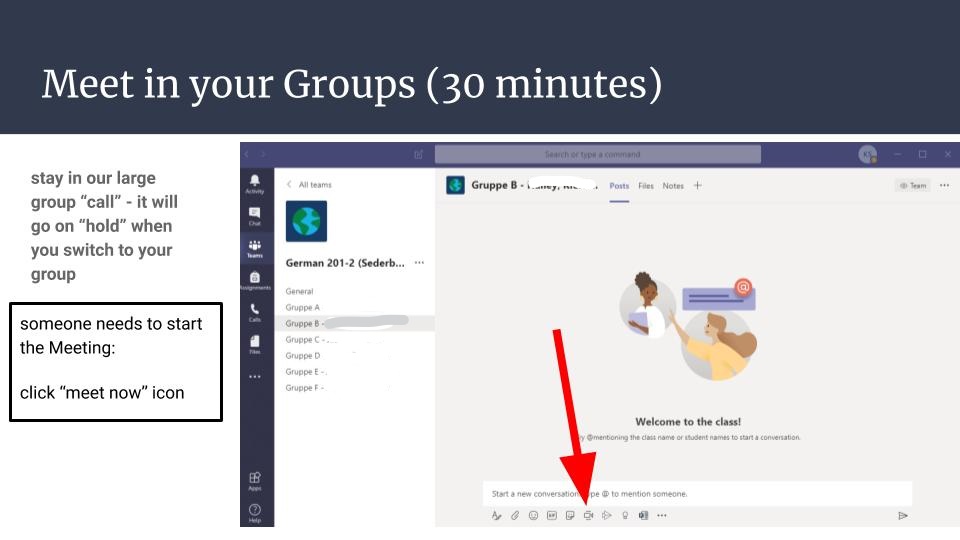
Microsoft Teams allows users to create channels within their teams, and from within a channel you can easily click on the “Meet now” button in the bottom toolbar to start a group call (with or without video). You can have more than one call going on simultaneously in a team, and as an instructor you can see who is meeting in each call, the duration of the call, and you can join and leave these calls. Students can also record their meetings. There is a chat associated with each channel and with each call/meeting.

In a typical class session, I would begin class by starting a video call in the “General” team channel. I would make small talk with students, take attendance, and do a warm-up activity and perhaps some review. Then at some point I give students a task to work on in small groups. For German 201, I created six small groups with 3 students each, and in German 470 I created groups of 3-5 students. While students are working in their small groups, I could leave the general call on “hold” and toggle over to “visit” the small groups by clicking on the channel names on the left sidebar and on “join meeting” from each channel chat. In this way, I could usually visit all groups during the hour. At the end of the scheduled group work time, students meet back up in the general meeting, which was left “on hold.”

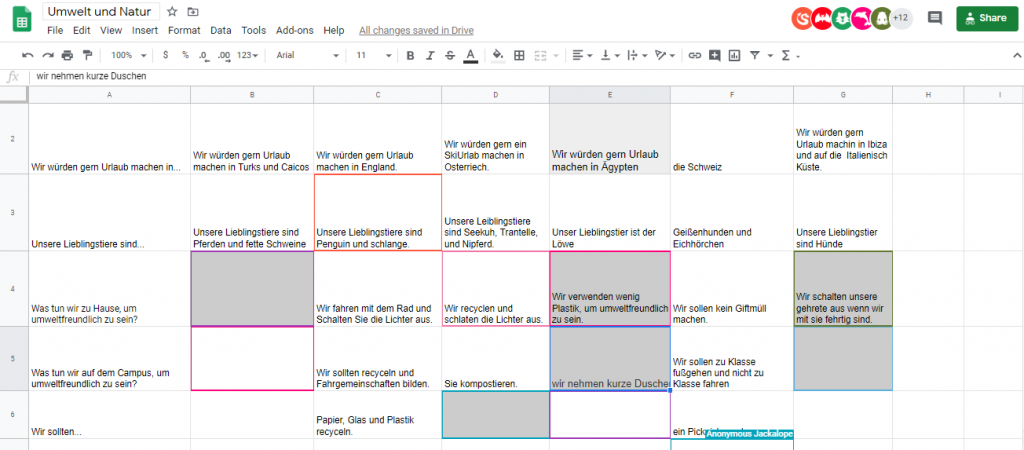
I found that it is important to create a clear and specific task (“Work through this set of 5 questions”) with a time limit (“Meet back in the main group in 30 minutes, at 10:30”), and to somehow hold students accountable for the work (“Designate one person to take notes”). I also found that the combination of Teams for small group video calls and collaborative, real-time documents like Google Docs or Google Sheets helped to hold students accountable for the work and allowed me to watch their progress in real time and check in with the students who needed assistance. For example, my intermediate German students asked each other questions related to our topic “nature and the environment,” and recorded their answers in a Google Sheet. I could see immediately how far the groups were in the activity, who needed help, and what grammar and vocabulary I needed to review with the whole class. In my upper-level seminar, to provide another example, students worked together in small groups on a Google Doc to summarize an article they had read, to write discussion questions based on a text, or to write a film review.  

How to set up channels in your team:

  1. Open your class team by clicking on the “Teams” icon on the left sidebar and selecting your class.
  2. Next to the name of the team, click on the “…” button and then “Add channel.” Give your channel a name that includes the names of the students, for example: “Group 1 – Max, Ben, Sarah.” This enables students to easily see which group they are in. Leave the default Privacy setting (Standard – Accessible to everyone). Important: click the box that says “Automatically show this channel in everyone’s channel list.”
  3. Continue to add channels for all groups following the instructions above
  4. You may also click on the “…” icon next to your Team name, and then on “Manage Team” / “Channels”. This allows you to select/unselect the boxes for “Show for me” and “Show for Members” and to delete channels

For my 400-level German class, I set up small groups that I changed every two weeks, mixing the students randomly. I found that students wanted a more stable group so they could get to know their small group members and 2 weeks was about right, because they also wanted variety and to get to work with different students in the class. In my 200-level German class, I changed the groups every week because they were smaller and the groups met more frequently. When you change up groups, you have the option to delete the old channels and thus their chat/call history (what I did), or you could also just re-title the channels with the names of new group members.

I also learned the hard way that if you click on “hide” under the channel options, the channel only disappears from view on your team, not for all members. I had a student screen share and was horrified that they had a list of 10+ different channels on the left sidebar – a confusing mess of old channels I thought I had “hidden” and thus cleaned up. You can manage channels that are shown by clicking “Manage team” / “Channels.”

Summary and Tips:

  •   Use channels in Microsoft Teams to create small groups.
  • Students can video call in small groups and the instructor may join and leave calls
  • You can have multiple video calls (meetings) going on at the same time within a team. You can leave the main (general) call “on hold” as a place for students to return to after their group meets
  • Be clear about how long students should meet in their group, and assign someone to keep an eye on the clock
  • Ask students how often they want to switch up small groups. You want to allow students to get to know their small groups, but also work with different students in class.
  • Use collaborative documents (Google Docs, Sheets) to see students work together in real-time and give feedback.
  • Teams allows you to view video for up to 9 users. If you create groups larger than 8, some students will be able to “hide.”

I want to end this post with a round of applause for Josh Moon and a huge thanks for all his help in supporting faculty over the past few months. Danke, Josh! 

Five Things: What students are telling us about online courses at K — Rick Barth

We’ve had one term of practice with online learning at K College. The lessons learned will be needed right away as we plan for a future of hybrid course design and delivery that we hope will be robust in the face of uncertain public health environment in this time of Covid-19. Throughout the spring quarter, we heard feedback from students about what was working for them. Much of their feedback fits into five big categories:

  1. Social Presence in a time of Physical Distancing
  2. Frequent Assessment with Rapid, Detailed, Personal Feedback
  3. Multiple instructional modes
  4. Transparent and frequently-repeated explanation of course structure and requirements
  5. Explicit attention to the new ways of learning students need to develop in order to achieve learning at a distance

Not surprisingly, the things that worked best for students are in many cases consistent with and predicted by work in the pedagogy literature. Here we weave together summaries of student feedback with a piece by Michelle Miller: “Online Learning: Does it Work?”

A 7.5 minute video by Rick Barth

1. Social Presence:

Throughout the spring term, we heard feedback from faculty about their sense of uncertainty in the absence of in-person face-to-face feedback from students. At the same time, students who reported positive experiences in their spring online courses comment again and again about instructors who found ways to create a sense of community and connection despite the distance learning format.

In her 2017 chapter “Online Learning: Does it Work?”, Michelle Miller writes:

Social distance is the flip side of the “social presence” concept first
articulated in the early days of telecommunications. It has to do
with the exchange of social cues and the feeling that one is authentically interacting with another person in the virtual environment. Creating social presence is another thing that online instructors need to pay special attention to, for example by encouraging students to offer personal information, eliciting supportive communications between students, and using communication tools that transmit facial expressions and vocal tone. Going the extra mile to do this doesn’t just make the class more pleasant, but is also an important predictor of success in the course.


The social feedback instructors get from students is also radically
altered in an online environment. In a traditional classroom setting,
students’ faces give you an instant read on confusion, disengagement, and other important problems. Students stop by before or after class to clear up muddy points or talk in-depth about topics that caught their interest, and the give-and-take of an interactive lecture gives you a good grasp of students’ level of understanding, at least for the ones who speak up. Online, these interactions are usually heavily time-delayed and mediated by text, particularly e-mail and discussion posts — two communication formats that have a well-known propensity to misrepresent emotional tone. To compensate, online instructors need to make formal inquiries to students about how the class is going, as well as keep a close eye on data such as frequency of log-in, late assignments, and assessment scores so that they can form an accurate picture of how students are faring.

Miller, M. D. (2017). Chapter 2: Online learning: Does it work? In Minds online: teaching effectively with technology. Cambridge, MA: Harvard University Press

2. Frequent, Rapid, Informative Feedback

Students who reported the best experiences with online courses at K often singled out their appreciation of prompt, frequent, detailed and personal feedback on their work products. They often call out as a challenge those courses in which work that was graded as simply “credit” or “complete” without thoughtful formative feedback. In a format that brings challenges in traditional social connection, students found it very powerful to interact with their instructors through assessment products. Quizzes, short written pieces, class discussion forum posts, as well as longer more integrative work. As we put thought into the design of our fall courses, it will help instructors and students to develop assessment tools that allow for this deep engagement. For this to work, the balance of instructor time likely shifts from activities traditionally associated with “in class” to an intentional workflow of managing frequent, rapid, informative feedback. In addition to written feedback, some instructors at K this spring found found that Moodle’s audio recording instructor feedback tool lightened the burden of providing detailed feedback while simultaneously providing a socially present alternative mode of interaction with students.

Miller writes:

This traditional “best practice” is widely cited as one of the things
instructors should spend as much time and thought on as possible.
Teaching experts Eric Mazur and Carl Wieman have been passionate advocates of providing a more dynamic, feedback— rich experience in traditional lecture classes. Similarly, rapid feedback is a key feature of the best online learning experiences. There are myriad ways to accomplish this online, including peer feedback, auto-graded quizzes, and branching lessons that present varying content based on student input.

M. D. (2017). Chapter 2: Online learning: Does it work? In Minds online: teaching effectively with technology. Cambridge, MA: Harvard University Press

3. Multiple Modes of Instruction

Students gave feedback that was, widely varied and on the surface contradictory: “Readings were perfect”, “impossible amount of reading”, “Loved asynchronous video lectures”, “Video Lectures were the worst”, “Loved synchronous class meetings”, “Synchronous classes were awful”. A more careful reading of this feedback suggests to us that students found success with many modes of instruction, but with some caveats:

  • 75 minutes isn’t what it used to be: Whether live or recorded, shorter (up to say 20 minutes) lectures were much more likely to be reported as helpful to students’ learning than attempts to “fill” the traditional class meeting period.
  • Variety was greatly appreciated: detailed instructor emails in a course structure containing other forms of interaction were highly appreciated. As the only form of interaction, students frequently reported with vehemence about the unsuitability of a “course by email”.

Online courses can be designed with an emphasis on alternating text with other forms of delivery, such as animated narration or Skype conversations, but it is difficult to get around the need for a great deal of written communication. This contrasts with the typical face-to-face course in which lecture, audiovisual demonstrations, and spoken discussion are a major part of the learning activities.


Students who aren’t strong readers, or who just prefer non-text
modalities, are at particular risk of falling behind in a text-heavy
environment. Unfortunately, we don’t have many solutions for these
less-proficient readers. Minding the reading level of material, keeping it to the level of a newspaper or lower, is one basic strategy.
When using synchronous, fast-paced activities like real-time chatting, it’s also important to weigh any potential benefits against
potential difficulties for slower readers. Building in lots of those
aforementioned alternate forms— narration, audio, and video— can
also give a boost to less-proficient readers.

M. D. (2017). Chapter 2: Online learning: Does it work? In Minds online: teaching effectively with technology. Cambridge, MA: Harvard University Press

4. Transparency about Course Structure and Requirements

When students gave negative feedback about their experiences with online courses, it was often in the form of comments about not have a clear idea about what they were meant to be doing and when they were meant to be doing it. Frequent assignment with rapid feedback is only as effective as the students understanding of the details of the assignments.

This factor might fade as more students get experience with online
coursework and as online-course designers begin to converge on
commonly accepted conventions for course structure. In the meantime, though, students often come to online coursework with a less developed sense of how things work than they would for a traditional course. Traditional courses superficially resemble high school classes, in that they are organized around set times and places for meeting, textbooks, and schedules of deadlines— so even students with little or no college experience can fall back on this familiar script to figure out what to do next. Just showing up for class can assure these less-experienced students that they will probably get by. But how do you “just show up” for an online class? In an online class (or the online parts of a blended or combination online/traditional class), it may not be clear where to start, how to spend one’s study time, or when the work is due. Good design, of course, offsets the problem of orienting students to the layout of the assignments— but even in a well- designed online course, students as well as teachers have to work harder to establish a basic understanding of how the course will work.

M. D. (2017). Chapter 2: Online learning: Does it work? In Minds online: teaching effectively with technology. Cambridge, MA: Harvard University Press

5. Help students explicitly develop the new learning approaches they’ll need for online courses.

A number of students who gave positive feedback about their experience in online courses at K in the spring reported a growth experience in their awareness of their own learning processes: The shift to online courses was difficult in the beginning and became more manageable as the students began to examine their own role as independent learners in environments that offered much less structure and many more distracting features.

Miller has a very thoughtful account of this:

More so than in the traditional classroom, students can seriously underestimate how much time and effort is required to succeed in online learning. Part of this problem may have to do with the much- vaunted “flexibility” of online coursework.

If the idea is that online learning fits in between family time, paid
work, travel, child care, and everything else in life, it likely ends up
an afterthought tacked on after all those other life activities are
addressed. And as we all know, exhausted, distracted, time- pressed students are unlikely to achieve stellar intellectual gains in any instructional format. Some experts argue that online learning’s tendency to become a “third shift”— i.e., something tackled after work and family duties are done— places a particular burden on female students, given their greater responsibility, on average, for the “second shift” of family work. Furthermore, in face-to-face teaching, you can ensure that some bare minimum of time is devoted to classwork (by policing attendance), and you can schedule classes when students are likely to be fresh (i.e., not in the middle of the night).


Neither of these basic strategies for ensuring maximal engagement
is easy to do online.Like many other quality issues, the third-shift problem can be addressed through forethought and savvy design choices. One good place to start is with a heavy dose of socialization at the beginning of the course about your expectations for student time commitment. Simply exhorting students that they will have to work hard and put in time has limited impact, but at least you can get your expectations out into the open early. Following through on your stated expectations, by having some small-stakes work due early in the semester, is another good practice for getting students into the right mindset.Beyond laying out your expectations and following through on them,
you can consider scheduling some synchronous-style work if you are concerned that students are just squeezing in little bits of work at odd hours. This approach has costs (such as potentially disadvantaging slower readers, as mentioned previously) and may be perceived as user-unfriendly by students, but it’s a clear way to exert more control over the pacing and timing of work.

M. D. (2017). Chapter 2: Online learning: Does it work? In Minds online: teaching effectively with technology. Cambridge, MA: Harvard University Press

Five Things: Moodle tips and tricks — Josh Moon

  1. Change activity dates in one place with The “Dates” Report
  2. Letting Students Upload Directly to a Folder
  3. Check Forum Posts in Student Profiles
  4. “Move Right” and “Move Left” for visual organization
  5. A little HTML can go a long way
A 2.5 minute video with Josh’s top 5 Moodle tricks

This Video is posted at Stream. Click here to learn more about Stream.

Friday at Four: Week 5

Homecoming Events for Faculty

Biology Reflections Seminar at 4pm

Please join the Biology Department for our annual Biology Reflections Seminar this Friday, October 18 at 4:10 p.m. in Dow 226. Alumni Amel Omari, K’09, and Ryan D’Mello, K’14 will be speaking on their journeys toward careers focused on health equity. Students, alumni, faculty, and staff are invited to attend.

Homecoming Connection Reception at 5pm

Please join students, alumni professionals, faculty and staff at an informal networking gathering.

Date: Friday, October 18th, 2019

Time: 5:00 pm

Duration: 2 hours

Location: Hicks Banquet Center

Sponsored by: Career and Professional Development

Contact: Rachel Wood, CCPD

Please join students, alumni professionals, faculty and staff at an informal networking gathering. Come prepared to share the story of your own career path, listen and learn from others’ work experiences, and explore professional possibilities both local and global. Hors d’oeuvres will be served and all are welcome. Attendees over 21 may enjoy an alcoholic beverage with proper identification. This is a great opportunity to network and make professional connections. Co-sponsored by the Center for Career and Professional Development (CCPD) and the Alumni Association Engagement Board (AAEB).

RSVP at  http://bit.ly/homecomingk19

For more information, visit:http://bit.ly/homecomingk19.

Friday at Four: Week 4

October 11, 2019, 4-5:30 pm

The Rescheduled Faculty Study

Arcus Center

“Binary and Non-Binary: Compressing Data and the Self”

Sandino Vargas-Pérez (Computer Science) will talk about data compression for genomics using high-performance computing and superclusters.“C” Heaps (Theater) will talk about the way non-binary and trans Twitch streamers perform their gender to a predominately white male audience.  
And as always, great conversations, non-nutritious Friday afternoon-worthy deep-fried foods, and icy cold drinks to share!

Friday at Four: Week 3

October 4, 2019, 4-5pm, DE206

Let’s talk about textbooks.

Kelly Frost from the library has begun exploring how students access required course materials, what barriers might exist, and how we as a College community can help. This fall quarter the library acquired required textbooks for 15 introductory courses and put them on Course Reserves. We’ll share the (very) preliminary results of this pilot project as well as any student surveys received. We’re looking forward to faculty input on the Textbook Project.

Review of Learner-Centered Teaching by Terry Doyle

Original Publish Date: February 19, 2017
By Patrik Hultberg

In this book Terry Doyle makes an evidence-based argument for learner-centered teaching practices. It is as convincing as the book is readable. The thesis of the book is “the one who does the work does the learning,” and it explores how to get students to do the work and what work they should be doing to optimize learning.

In the Foreword Todd Zakrajsek writes “Teaching is not something that should be left to trial and error, and it certainly should not be done without building on an understanding of what is known about this vital activity.” After reading Doyle’s book, faculty members will have a good understanding of the research on how students learn, why learner-centered teaching (LCT) best accommodates this research, and practical ways to implement LCT in their own courses.

Bjork (1994) defines learning as “the ability to use information after significant periods of disuse and it is the ability to use the information to solve problems that arise in context different (if only slightly) from the context in which the information was originally taught.” That is, learning implies that students are able to both recall knowledge and skills after the exam/course is over, and are able to transfer the knowledge to novel situations encountered in the “real world.” The only way to reach these learning outcomes, the book argues, is for students to actively engage in learning the content and skills, and then use and practice the learned content and skills for significant periods of time; this is what learner-centered teaching attempts to achieve.

In brief, these are the main topics covered:

  • Research from cognitive psychology that supports the notion that learning is a change in the learner’s brain.
  • How to motivate students to do the work (given their long experience with teacher-centered teaching). Many strategies provided for how to achieve this.
  • A case for the power of authentic learning; that is learning in contexts that involve real-world problems and projects that are relevant to the students. It is hinted at, but I would emphasize, that these projects should be matched with the students’ level of expertise (cognitive load theory) and the amount of instructional guidance should be carefully calibrated.
  • The book does not completely dismiss lecturing (almost), but it does make a strong case for faculty to move from being lecturers to being facilitators of learning. Practical, step-by-step, advice on how to achieve this is provided and it basically boils down to creating daily lessons plans (not lectures) including daily learning goals, activities, practice, and feedback. A case is made for limiting faculty “talking” in favor of (effective) class discussions.
  • The importance of getting to know our students in order to create a safe and comfortable learning environment, as well as promoting a growth mindset among the students. The importance of relationships and community.
  • A case is made for giving students control and choices in terms of course policies, content, teaching methods, and organization.
  • Several chapters are devoted to teaching in ways that support our evolutionary past, such as teaching to all the senses, highlighting content patterns, and using the evidence-based learning strategies of spacing, interleaving, retrieval practice, and elaboration (reflection).
  • The book also highlights the importance of sleep, nutrition, and exercise to learning.

Overall, the book makes a strong case for learner-centered teaching. I agree.

Reflections on Tutoring

Original Publish Date: October 21, 2016
By Reid Gomez

Tomorrow I receive the first batch of papers from the Insurgency and Solidarity class. The assignment: write three paragraphs. The first: where you currently stand in relationship to the material (previous knowledge). The second: what you hope to get out of the class (expectations). The third: your areas of special interest.

I tell them, up front, the assignment is for me. Can you write a paragraph with sentences? I’m big on study skills. What do I need to change about the course, now?

I learned how to teach from a lot of people: my grandparents, and most explicitly the Writing Program at the Student Learning Center at the University of California at Berkeley. As tutors we worked directly with students, and we also met in a weekly seminar where we discussed the pedagogy of writing. I worked my way up from an individual tutor, to a workshop leader (labor resource for the UC system that is largely diverting teaching to undergraduate, graduate and professional services), and finally to a senior tutor (tutoring others on how to tutor).

At our colloquium I appreciated the focus on “good tutoring.” When I’m lost I go back to the skills I learned and used as a tutor. The one on one delivery and co-exploration of content continues to be the foundation of my classroom practice. I’ve changed. The students have changed. But one thing remains the same: we have to know each other to work well with each other.

I made it through Cal because of my writing tutor. I became a writer, in part, because of him: Augustine Robles. I was taught that writers could spell, pronounce correctly, never used double negatives, and did not write run together sentences. I couldn’t do any of those things—spell check did not exist, and the dictionary was my nemesis (all those words spelled correctly). Augie told me, “hey, I think you could be a tutor.” And, I applied.

The first assignment I give allows me to change, yes, change the course, now. The changes are some times small (drawing examples from their research areas, not mine) and they are sometimes large (letting a student select a book I have not listed on the books to chose from list). They keep me on my toes, and I try to keep them on theirs.

I believe our relationship as learners and leaders in the classroom is what shapes the class and their engagement with the material. I hope the class process (framework) gives them a method (theory) to approach evaluating materials, stretching their minds, and developing analytical abilities for whatever content, in whatever field, they encounter. Co-producing knowledge also makes them better teachers themselves—demystifying the process.

Teaching Students How to Learn

Original Publish Date: September 26, 2016
By Patrik Hultberg

All of us want our students to learn as much as possible in our courses. This is why we stay current in our disciplines, attend workshops related to pedagogy and teaching effectiveness, and perhaps pick up the occasional book on teaching. Many of us, perhaps all, have experienced the frustration associated with our best intentions not leading to student success in our current course and a lack of transfer of learning to future courses. It is possible, perhaps likely, that deep and sustainable learning by our students require them to do act differently. There might be a need for our students to employ more effective learning strategies.

This is what Dr. McGuire proposes in her book “Teaching Students How to Learn.” She recommends, nay urges us, the professors, to be the ones to teach our students how to learn our material more effectively. Our first reaction might be that this is not our responsibility and that students should have learned to study in high school. Unfortunately, it is and they have not. If we truly want our students to learn the material we care so deeply about, we should teach them how to learn it – and Dr. McGuire’s book tells us exactly how to do so.

Dr. McGuire presents 39 learning strategies for students and 33 strategies for instructors (as well as step-by-step guidelines and PowerPoint slides). Far too many helpful tips to elaborate on in this brief note, but the concept of metacognition, the ability to think about your own thinking, lies at the heart of her approach (p. 16). Her strategies focus on students being aware of themselves as learners and problem solvers; to be able to actively seek out solutions and accurately judge their own progress toward solutions without relying on others to provide answer for them.

To help students develop metacognition, Dr. McGuire offers learning strategies, which she defines as anything that helps the student/learner engage with, process, remember, and apply information (p. 27). Dr. McGuire promotes active learning, as well as asking our students to move up the Bloom taxonomy of learning levels, and her suggestions are mostly focused on what students will do at home, away from our classrooms.

In broad terms Dr. McGuire recommends that students use the “study cycle,” which incorporates a preview of material before class, class attendance, review of material after class, 3-5 intense study sessions per day, and finally assessment of their own learning. (p. 39). Naturally the intense study sessions are especially important for learning and Dr. McGuire recommends setting specific learning goals, using active learning tasks, and review (as well as taking breaks as needed). These are great recommendations and can be easily combined with evidence-based learning principles from cognitive psychology such as spacing, interleaving, generation, elaboration, and retrieval practice (Brown et al., 2014 and blog #1) , which would further support deep and lasting learning.

Dr. McGuire puts a special emphasis on reading strategies and in doing so she argues against the common practice of students simply reading and re-reading textbooks and notes, a practice that might have sufficed in high school but is likely to fail in college. In brief, her recommendations for effective reading involve student preview, active reading, and retrieval practice after completing the reading. She also presents many additional strategies ranging from note taking techniques, use of homework (don’t look at solved examples), time management, and mindset considerations. Dr. McGuire also encourages us, the teachers, to construct courses and lessons that foster intrinsic motivation among our students by fostering autonomy, competence, and a sense of belonging among our students.

In conclusion, Dr. McGuire makes a strong case for why we should teach our students how to learn and she gives us all the tools necessary to actually doing so. The only question is, will we? Will you?

An additional question could be, am I using the strategies that Dr. McGuire recommends? Below I discuss five strategies that I do use and five strategies that I do not use in my classes.

Strategy 8.

Create a course syllabus that makes your expectations, your course structure,requirements for success, and student responsibilities crystal clear.

I spend a significant amount of time creating syllabi using backwards-design. That is, I try to determine first what skills and knowledge I wish for my students to have at the end of the course (course goals/outcomes). I then think about how I will know whether or not students have achieved these goals; that is, what kinds of assessment are needed. Next I determine what learning activities a student should be exposed to in order to be prepared for the chosen assessment activities – in my classes this mainly involves active learning projects (problem solving) and various formative assessment opportunities. I then, finally, consider what resources I need to make available for students (readings, videos).

Strategy 9.

Require a textbook.

I require students to read a textbook section (and/or article) before each class session (sometimes I ask them to watch videos instead). I ensure that all students do the required reading (watching) by giving them a quiz, usually online, before the class begins. I do not “reteach” material from the textbook, rather I expect students to know (remember and have basic understanding) the material and we then work on higher levels of learning in class (Bloom’s taxonomy: deeper understanding, applying, analyzing, and evaluating).

Strategy 13.

Interweave assessment and teaching by testing early and often. Doing so will encourage more students to keep pace with the course.

I’m a strong believer in testing (retrieval practice) so I constantly build in low stakes summative assessments regularly and often. I also use online quizzes in all my courses, usually before each class session. I also use formative assessment as an active learning activity in my classes quite often (team quizzes and problems, individual problems combined with think-pair-share). My courses are largely structured around students always being up to speed in the course; e.g. pre-class quizzes ensure this. I have reduced the number of high-stakes exams, often offering no more than two (midterm and final). I have also tried to introduce more student agency and choice in my courses, but I can still improve on this effort.

Strategy 19.

Make class sessions more engaging by introducing active learning strategies such as think-pair-share, small group problem solving, and reflection questions.

Since I have switched most of my courses to the flipped classroom approach my face-to-face interactions with students are almost exclusively active learning projects. In addition to the activities similar to those mentioned in the strategy I also use role playing exercises. I rarely lecture more than 20-30 minutes during a two hour class session.

Strategy 24.

Give students opportunities to work together in small groups by administering group quizzes, group problem-solving exercises, or group projects.

As I mentioned, this is the general approach during my face-to-face time with students. I often use team quizzes, sometimes asking the students to take the quiz first individually and then as part of a team (grade is weighted average of the two). Group problem-solving activities are my main pedagogical strategy in class. I also assign many group projects outside of class, such a team papers and presentations.

Two additional strategies that I try to implement in my courses are (Strategy 1) emphasize that students’ actions, not their intelligence, will determine their success, and (Strategy 2) create a supportive environment in the classroom by demonstrating your belief that all students can be successful and that you will help each one of them attain success.

The following five strategies are currently not used in my classes. I hope to begin incorporate some of these strategies.

Strategy 3.

Teach students about metacognition, Bloom’s taxonomy, and the study cycle.

Strategy 6.

Give a 45-60 minute learning strategies presentation after students receive the results of their first test or quiz.

Strategy 18.

Provide students with targeted feedback, perhaps with a comment that you are providing the feedback because you have high standards and believe in their ability to meet or exceed them. [I do give students feedback, but not as “targeted” as described here.]

Strategy 23.

Assign students real-world tasks to help them develop a sense of belonging to the larger community. [I use cases and problems that simplify the real world, but these are not usually from students own backgrounds or the local community.]

Strategy 30.

Have students take a learning styles preference diagnostic test and write a reflection about the strategies they will use in class. [I don’t do this and never will since the learning styles as a pedagogical tool has not been shown by the research to be effective. I do use dual coding, combining verbal explanations with visuals and hands-on activities.]